Visar inlägg med etikett Sonicspree. Visa alla inlägg

söndag 9 januari 2011

Sonicspree on Surface 2

The new version of Sonicspree is completely rewritten from the ground and up. It has a new design, new architecture and new frameworks but with the same engaging and social gameplay. The goal of the game is to find a matching album cover to a song playing before one of your competitors does. The faster you do it, the more points you get. If you guess wrong you will lose some of your points.

One of the biggest challenges with the first version of Sonicspree was how to do with music and album covers when installing the application on different units. That version used local mp3 files with embedded graphics. This time we wanted a more flexible solution so we turned to the Swedish online streaming music service Spotify. So this version of Sonicspree is powered by music from Spotify.

Sonicspree_3_

Sonicspree was built using Visual Studio 2010 and Blend 4 in a tight collaboration between developers, user interface designers and interaction designers. To make a clear separation in the developer/designer workflow we have used a Model View ViewModel design pattern and the MVVM Light Toolkit.

One game in Sonicspree now consists of several gamerounds and each gameround consists of five songs. The dice still play an important role in Soncispree and they can be rolled before each gameround to decide the genres to use.

Sonicspree_1

When a song starts playing, the players drags the hidden album covers to the center of the table to reveal the cover. When someone finds the correct cover they drag it home to its own nest to make a guess. If it is correct a new song starts playing and if its wrong the nest shakes and spits out the cover.

Sonicspree_2

lördag 8 januari 2011

Surface 2 and Sonicspree

This week at CES in Las Vegas Microsoft showed the next version of Surface for the public for the first time. It was at the Ballmer keynote that the world got a first glimpse of what’s to come. With the first version of Microsoft Surface Microsoft the hardware was built by Microsoft but this time they have teamed up with Samsung to create the “Samsung SUR40 for Microsoft Surface” witch is the official name. The new unit is pretty much everything you wanted and asked for in an upgrade plus some extra! It is a 40-inch 1920x1280 display covered with Gorilla Glass (same kind of glass as in many smartphones). The first version of Surface has a glass with a matte finish witch is very different from the feel we now will experience.

microsoft_surface_sur40-580x386

The new version is only four inches thick and uses a completely new technology called Pixel Sense. With Pixel Sense every pixel acts like a “camera” and can supply information about what’s happening on the glass. All this information is processed in 60 frames per second. Since it is only four inches thick, the SUR40 can also be wall mounted and the SDK will notice at what angle the unit is at and can respond accordingly. It will only detect change in angle in landscape mode but not in portray mode. An application can change its appearance based on how much the monitor is tilted. As a developer you will not get an event when the tilt changed but that is understandable since it still is a pretty large piece of hardware!

There has been a TAP program running for the new Surface since May 2010. Connecta has once again teamed up with Ergonomidesign and collaborated to develop an application on the new hardware and with the new SDK. One of the biggest challenges we have had was the limited access to hardware. The first time we got to see it was in November, on site at Microsoft in Redmond, and we are still waiting to get continuous access to hardware. So we have basically developed everything using only the new SDK and sent bit to the Surface team in Redmond for testing. The reports that we have gotten back has been positive and that really is a good rating for the SDK, i.e. it is possible to develop great apps without having access to hardware. But to get it perfect you still need hardware because you will notice things when several people are using the app at the same time that you never will see in a simulated environment.

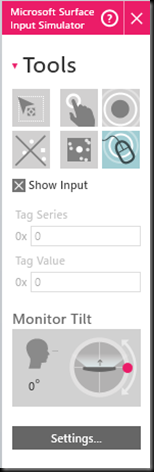
Speaking of simulation, the old simulator from v1 is gone. Please welcome the Microsoft Surface Input Simulator!
inputsimulator

With the Microsoft Surface Input Simulator, the application is running in full screen on your monitor and input is simulated to let you as a developer work with fingers, blobs and tags similar to as it was done in v1. The input simulator can also simulate monitor tilt in 360 degrees. On limitation so far is that your screen resolution has to be at 1920x1280 to get the exact same view as you will get on real hardware but that high resolution is not a requirement to start your app.

The application that we have created for Samsung SUR40 for Microsoft Surface is a new version of the popular music game Sonicspree. We will write more about that in coming posts but here is the new logo and screen shot.

icon

gameplay

Please follow #Sonicspree on Twitter for continuous news about where you will be able to experience Sonicspree and Samsung SUR40 for Microsoft Surface during the following months.

söndag 17 januari 2010

Surface at PDC09

(Should have posted this two months ago… Found it as a draft in Live Writer today…)

At the last day of PDC 2009 I attended the only session about Microsoft Surface. It was presented by Robert Levy who is Program Manager for the Surface team and his equivalent from the WPF team. The session was interesting and it’s always to see the fun stuff that the Surface team has cocked up. This time it was the Surface Monster that stole the show. Videos and more info is available on http://www.surface.com/monster

The WPF-demos showed of the multi touch capabilities of WPF 4 where you can scale, rotate and transform objects on touch enabled hardware. The example is similar as in my previous blog post (multi touch). Please note that that example is for beta 1 for Visual Studio and that some things have changed to beta 2. I plan to post an upgrade soon.

The session was probably perfect for those who were new to touch or new to Surface and also draw some applauds from the crowd. For a developer already up and running with Surface it was fun but not much new. I would have liked to see another session on the program with Surface SDK Deep Dive or Performance Tips When Developing for Microsoft Surface or Surface from the Trenches – Experiences from a Real World Surface project. What I look for is more level of depth with two sessions, one introduction and one a bit deeper.

One new announcement was the Surface Touch Pack for Windows 7 that will enable you to use the same controls in WPF for Windows 7 as you do in Surface which is really cool! Robert also “announced” that they are working on units that will be cheaper, thinner and wall mountable. That wasn’t too hard to guess and no real details were available. I was hoping to hear something about Surface SDK 2.0 that hopefully will be on the way with some new controls, new gestures and maybe detection of a hand in the contact events.

Earlier on the conference I did get a chance to show the two applications that I have been part of the development team for, Sonicspree and HelpingHands. The feedback from Robert and another guy whose name I can’t remember were all positive. Not sure that they liked what we had done with the element menu but I think they bought the reasons we had for doing what we did. We have changed the behavior of the element menu in HelpingHands so that it will act more like a toggle menu and stick even when the user removes her finger.

All in all it has been a good PDC from a Surface point of view. Cool stuff on the session, one on one time with the team and confidence in that the applications we develop at Connecta are top notch!

måndag 7 september 2009

Alive again

When I wrote my last blogpost about Surface our unit was dead. That was before the summer but now we are back on track again. The unit got replaced by Microsoft and our new SP1-unit is now up and running again at Connectas head quarters in Stockholm. There is still some work to do to get every application installed again but most of the work has already been done by a colleague of mine. Last week I conducted a demo for a group of people at a large Swedish company which was really fun. I think it sparked many thoughts among the participants. Before the demo I Connecta-branded the Music and Photos app and did the final install of Sonicspree.

Regarding Sonicspree there has been some development over the summer. Some of the work was regarding bug fixes but most importantly, virtual dice! So now the application can be started without the fantastic dice that Ergonomidesign created for Sonicspree to From Business to Buttons. This facilitates a lot because it has previously been a bit sensitive to where we store the dice.


This fall we will have two more or less public appearances with Surface. The first is at Microsoft Parter Summit on the first of October at Kistamässan in Kista, Stockholm, Sweden. We will be there with our Surface to show Sonicspree to the masses and where we also will attend .NET Awards. I hope that every reader will take a minute to place a vote for us here. Seriously, it takes less than a minute!

The other event we will attend is Sign Scandinavia in November but more information on that later.

Internally we have been working on a demo together with SAP on Surface. I personally haven’t been involved in the development of the application but there is some form of SAP/Connecta-event on Wednesday so I think the project should be done really soon.

This was just a short update to let you all know that we don’t have a dead Surface anymore but one that is alive and kicking.

torsdag 25 juni 2009

Sonicspree video

Our friends at Ergonomidesign have created a short video of Sonicspree.

torsdag 18 juni 2009

Sonicspree


During the last weeks I and some other people from Connecta have been involved in a project together with Ergonomidesign. Our goal was to build something to showcase on the conference From Business to Buttons that took place last week in Malmö, Sweden. Our case was to build an application that could exist in a retail telecom store, attracting customers to the store and making them stay longer.

Our application, Sonicspree, contains of two sides. On side is called the Store Mode and the other is called the Quiz Mode and both have a clear music focus. The part that we have developed so far is he music quiz.

While creating Sonicspree we have stayed true to some really important fundamentals of design for Microsoft Surface and that is 360 degrees UI, interaction with physical objects and multi user.

The game can be played by up to six people at the same time, spread around the table. Each player has a player area where the player score is kept. The game starts when someone rolls two dice to decide genres for the music in the quiz. When the dice are removed album covers start floating around the screen with the back side facing up and a song from one of the two genres starts playing. Each user starts dragging covers to the center of the table where the front side is revealed. When a user finds the matching cover to the song that is playing she drags that cover to her player area.

The dice and the flip-flop that is used to change from quiz mode to store mode are custom made by Ergonomidesign.


Quiz mode


Store mode


Custom made dice


Playing the game